Mealie, a local LLM, and a meal plan that writes the shopping list
In August I put Mealie, a self-hosted recipe manager, on the homelab box. It has a meal planner and a shopping list, and it can import a recipe from almost any website with one click. Today I published a companion service for it, mealie-toolkit, which tidies up every imported recipe using the local LLM, and turns the week’s meal plan into a shopping list at the sizes we’ll actually cook.
Seeding it
An empty recipe manager isn’t much use, so I started with two sets of 45 recipes from BBC Good Food. The first was mains, filtered on low saturated fat and chosen to widen a rota built around salmon, sea bass, chicken breast, black beans and tortillas, with some winter soups and slow-cooker dishes. The second was cakes, desserts and snacks, with a ceiling of 10 g of saturated fat per portion, though most sit far below that.
Good Food wasn’t a random choice. Mealie’s importer uses the recipe-scrapers library, which supports around 738 sites. Of those, Good Food is the only UK one that publishes saturated fat per serving in machine-readable form. That meant I could filter on real numbers rather than guesswork, and Mealie imports the nutrition panel as well. (It then hides it on every recipe by default, but that’s one setting.)
The ingredient problem
An imported recipe stores each ingredient as a single line of text: “2 garlic cloves crushed”. To add things up on a shopping list, Mealie needs them split into quantity, unit, food and note, and that’s fiddlier than it looks. The food is a shared record reused across every recipe, so it must hold just the base name, never the prep words. “½ tsp finely chopped rosemary” is 0.5 / tsp / rosemary / finely chopped. “2 x 400g cans chopped tomatoes” is 800 g of chopped tomatoes. Weights beat counts, and “coriander” mustn’t become “cilantro”.
Mealie has an AI parser for exactly this, and I pointed it at my llama-server. It showed a spinner that never finished. The configuration, networking and structured output were all fine. The problem is that Qwen3.5 is a reasoning model, and Mealie gives it no way to switch the thinking off. Timed on one 20-ingredient recipe:
| Request | Time | Output tokens | Correct |
|---|---|---|---|
| As Mealie sends it | 361 s | 15,933 | 20/20 |
reasoning_effort=none | 264 s | 11,088 | 20/20 |
chat_template_kwargs: {enable_thinking: false} | 28 s | 880 | 20/20 |
Mealie gives up after 300 seconds, hence the endless spinner. llama.cpp ignores reasoning_effort, and Mealie can’t send chat_template_kwargs: its provider settings end up as URL query parameters, and its custom headers as HTTP headers, but neither goes in the request body. The server itself can be told not to think by default, but the same server does voice and my news digest, so I didn’t want to change it for everyone.
So through August, the parsing was done by a Claude Code skill in my Mealie working directory, following a written set of conventions. Along the way it merged duplicate foods (plurals, and “chicken legs” versus “chicken thighs”), labelled every food with its supermarket aisle, and tagged the mains by protein and season. One of the rules came straight from me: anything slow-cooked is winter.
That worked, but I didn’t want a routine job like this to depend on Claude running on a laptop. It’s exactly the kind of task my local LLM setup is there for. So I wanted to bring it back to the local Qwen, with the thinking switched off, but without having to patch Mealie’s own AI parser to do it.
mealie-toolkit
The toolkit moves all of that into code, with the local Qwen making the judgement calls, and it runs by itself. Mealie sends a recipe_created event through its notifier system (Apprise), and a json:// notifier POSTs it to the service. The event is only a trigger. A bulk URL import sends a single event carrying a report ID, before it has scraped anything, so the service waits for the report to finish and then sweeps for any imported recipe it hasn’t processed yet. A periodic sweep catches any events that went missing. For each recipe it:
- Checks the scrape, and rebuilds a broken import from the source page. One site had dropped its recipe metadata entirely.
- Fills in missing nutrition, including saturated fat hidden inside the fat figure, like
"12.1g (2.1g saturated)". - Parses the ingredients with Qwen, thinking off, sent per request so the shared server keeps its defaults.
- Matches each food and unit to what’s already in Mealie, and creates a new one only when nothing matches.
- Files it: a category, tags and tools, chosen only from Mealie’s existing vocabulary, plus a few rules in code.
Anything it isn’t sure about gets a Needs review tag and a note saying why. It takes about 15–35 seconds per recipe. Against 20 recipes that were already parsed and filed, it matched 91% of 222 ingredient rows on every field and got the category right 19 times out of 20. The tags are the weak spot (precision 71%, recall 84%), and seasons are the least reliable of all.
Not trampling on my edits
An LLM rewriting recipes in the background is a good way to lose a correction you made by hand, so there are some guard rails:
- Edit guard. If the recipe’s
dateUpdatedchanges while the model is working, because I’ve opened and saved it in the meantime, the write is abandoned and retried on the next sweep. - Undo. The recipe as it was before each write is saved as a snapshot, and
undo <slug>puts it back. - Additive only. Categories, tags and tools are only ever added, never removed, and ingredient rows that are already parsed are never touched.
From the meal plan to the shopping list
We plan the week’s meals in Mealie, but when you send the plan to the shopping list, you can’t choose how much of each recipe you’re making. Most of these recipes serve four. So the toolkit also serves a page on Mealie’s own domain, styled to match and using Mealie’s login, that takes over at that point.
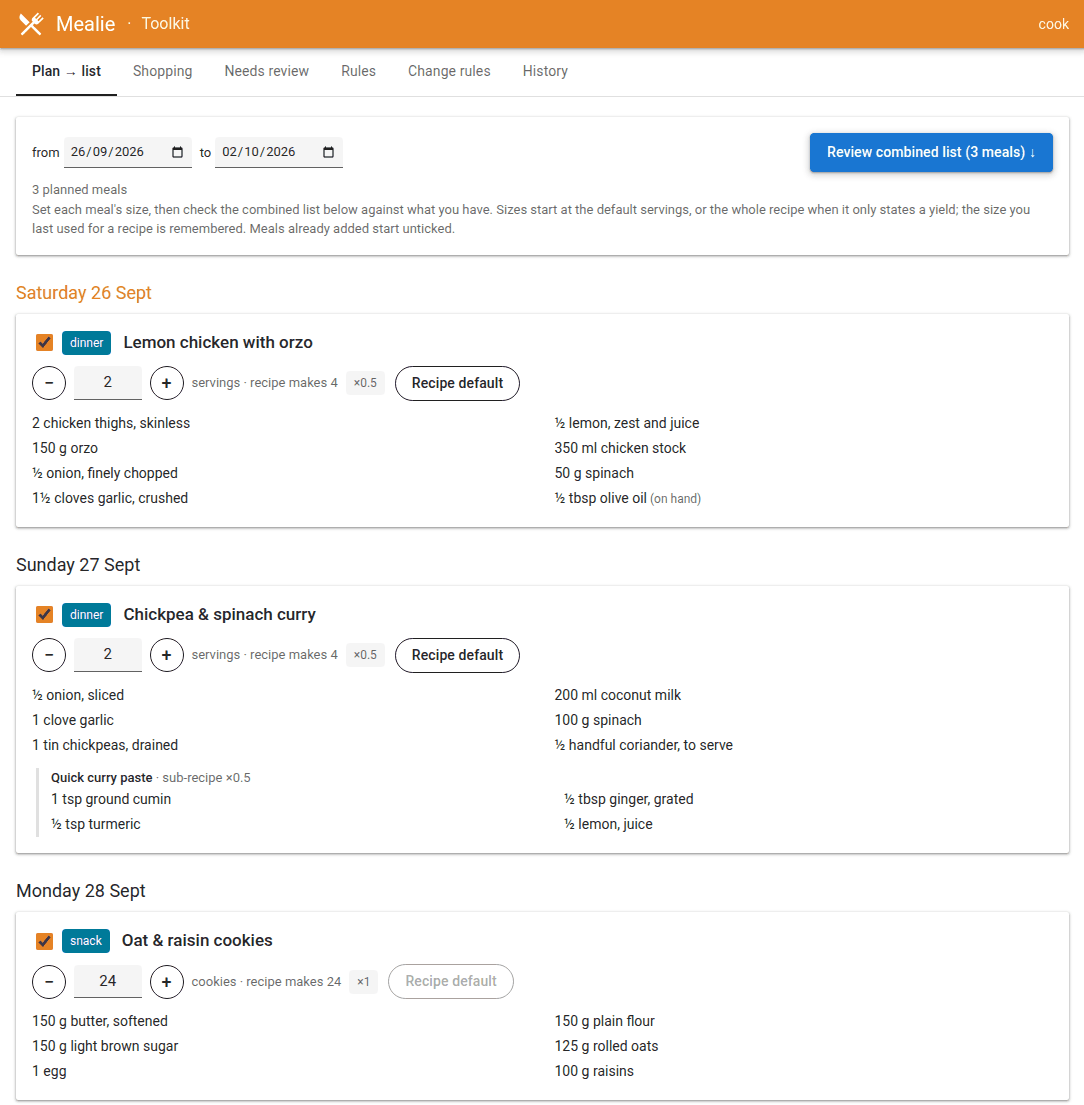
Each planned meal gets a size, starting at two servings (or the whole recipe, for things like 24 cookies), and the ingredients follow as you change it. The size you last used for a recipe becomes its default next time. Then a combined list adds everything up per food, grouped by aisle, and shows where each amount came from, with when I last bought it off to one side:
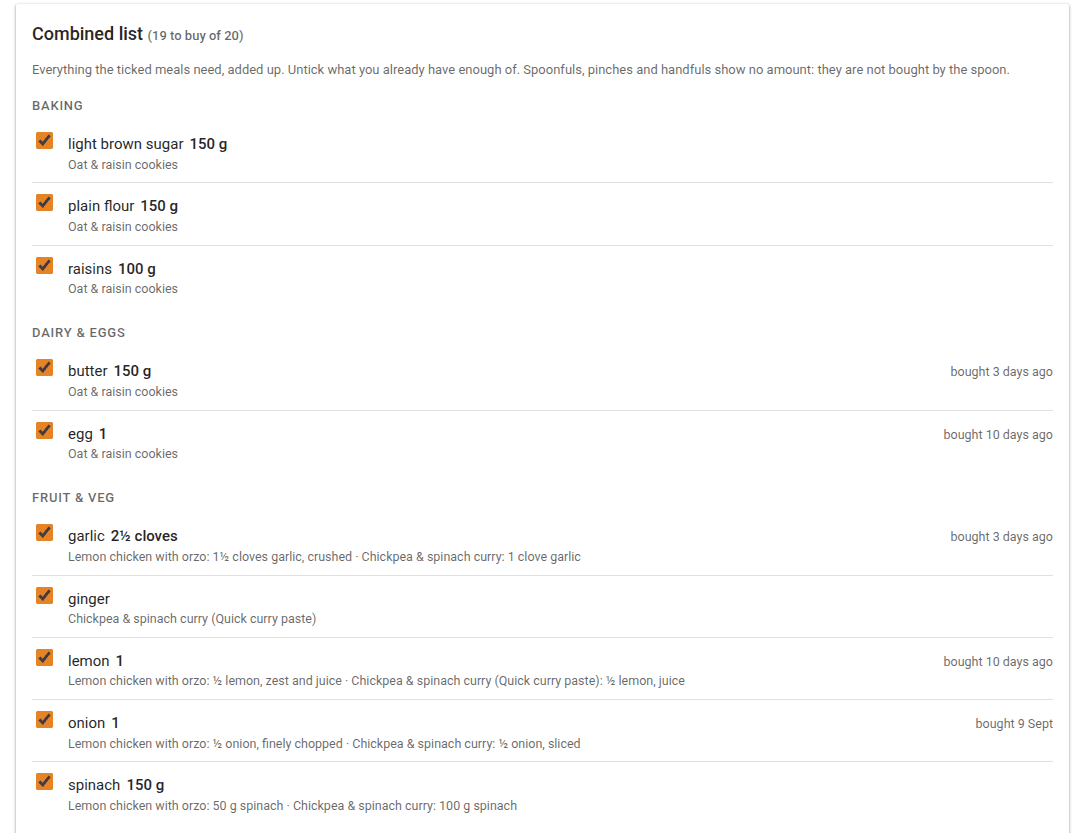
Spoonfuls, pinches and handfuls show no amount, since nobody buys paprika by the teaspoon. Untick anything you already have enough of, and Add sends the rest through Mealie’s own add-recipe call, at each meal’s scale.
Another tab merges Mealie’s list with our Home Assistant shopping list into one list of plain names, ready to paste into the supermarket’s “search by list” box. It can then tick everything off in both places afterwards. If I forget to tick off after a shop, setting “added since” to the shop’s date moves the older items into a “probably bought already” pile.
Finally, the rules the model follows (what each tag means, and the prompts themselves) live in files that the page can edit. You describe a change in plain words, Qwen proposes an edit as a diff, and you can try it on an existing recipe before applying it. Every change can be reverted.
Discover: finding more recipes
The last piece closes the loop: instead of me hunting for recipe links, a Discover tab goes looking for them. It searches BBC Good Food with Good Food’s own filters: meal type, diet, minimum star rating, time, cuisine and difficulty, with the most popular first. It quietly drops the paywalled premium recipes, since there’s no point importing a recipe you can’t read.
Good Food’s search results don’t say much about nutrition, so Discover reads each result’s page for saturated fat, calories, servings and time. That lets me filter per serving, which is the number that actually matters. Pages are cached for 30 days, and anything already in Mealie is hidden.
Tick the ones you like, press Import, and they go off to Mealie’s bulk importer. From there each one sets off the same post-import processing as everything else: scrape check, nutrition, ingredients, tags and aisles. So a recipe goes from “that looks nice” to filed, parsed and shoppable without me touching it.
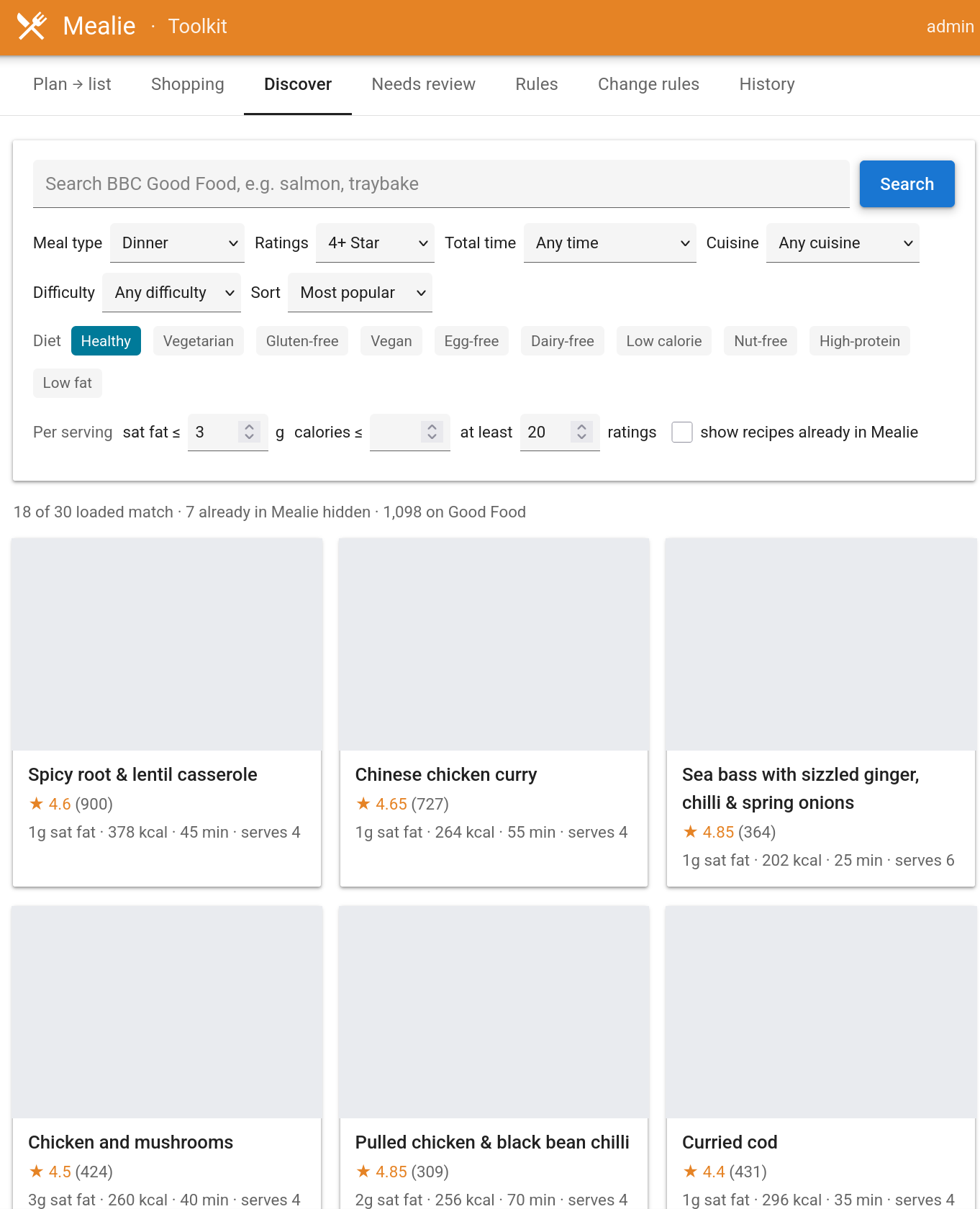
The recipe images were intentionally turned off for this screenshot.
Where it’s at
It’s running on the homelab box and processing every import. The code, prompts and default rules are on GitHub, with the host-specific bits taken out so anyone running Mealie next to an OpenAI-compatible endpoint can use it.
Project assisted by Claude Code.