metermon goes Zigbee: an electricity meter on a nice!nano
Four years ago I built metermon, a battery-powered ESP32 that counts the flashes of our electricity meter’s LED. It has one big compromise. Wi-Fi is so power-hungry that the ESP32 sleeps through ten flashes at a time before waking up to report them, so Home Assistant sees the meter in 10 Wh lumps and never knows what the house is drawing right now.
Zigbee was designed for exactly this kind of gadget. A Zigbee sleepy end device spends nearly all its time asleep and only wakes briefly to talk to its parent, at a tiny fraction of Wi-Fi’s cost. So this is metermon’s sequel: the same trick with the LED, on a radio that can afford to speak up.
What actually prompted it was the battery. Metermon runs on a lithium-ion cell, which turned out not to be a great idea: it started puffing up, probably because of the cold. This time I wanted something that would run from ordinary NiMH AA batteries.
The hardware
The board is a nice!nano v2, a Pro Micro-sized board with Nordic’s nRF52840 on it. It’s popular for home-made keyboards, and the clones are cheap. The nRF52840 has a proper 802.15.4 radio, so it can do Zigbee and Thread, and there’s a LiPo charger on the board.
The sensor circuit is metermon’s, more or less. A reverse-biased photodiode sits between 3.3 V and an input pin, with a 1 MΩ resistor to ground, so a flash from the meter pulls the pin high. This time the photodiode is powered from a spare GPIO rather than straight from 3.3 V. A pair of 1 MΩ resistors halves the battery voltage so the ADC can read it once an hour. There’s also a button: a short press fakes a pulse for testing, and holding it for five seconds does a factory reset.
The firmware drives one pin low to switch off the nice!nano’s external regulator, which isn’t needed here. Asleep, the whole thing measures about 17 µA, with brief spikes to around 50 µA when it polls its parent or transmits. That’s in the same league as metermon’s 14 µA, while reporting far more often.
It runs from three NiMH AAs in series, which comes out at roughly the same voltage as a lithium cell. The one catch is charging. I have to remember to charge the batteries separately, not through the board’s USB socket, so that the cells stay balanced.
Getting a toolchain to build
I started at the end of March from felipejfc’s nice!nano Zigbee example, which showed that a Zigbee build for this board was possible at all. Getting my own build going with nRF Connect SDK 2.9.2 and Nordic’s Zigbee add-on still took two fixes:
- The SDK looks for the 802.15.4 radio library in a directory called
nRF52840, but it ships asnrf52840. On a case-sensitive file system that’s the difference between building and not, and a symlink sorts it out. - The board definition doesn’t name a console device, which the USB debug build needs, so there’s an overlay that adds one.
The firmware itself is a Zephyr application. It presents a Zigbee Metering cluster, with the total energy in watt-hours and the instantaneous power in watts, plus a Power Configuration cluster for the battery.
The ZBOSS reporting gotcha
Zigbee meters normally give their total energy with a divisor, so a raw count of watt-hours with a divisor of 1000 displays as kilowatt-hours. The obvious thing is to do the same here. Do that, though, and single pulses never turn up in Zigbee2MQTT at all.
It turns out Nordic’s Zigbee stack, ZBOSS, applies its own reporting threshold to the metering cluster’s total. With the divisor at 1000, it quietly suppressed any report where the change was less than about 0.1 kWh. So the meter would sit on a pile of new watt-hours until it had a hundred of them, which made it worse than metermon.
The fix is a bit of a dodge. The device now claims a divisor of 1, so each pulse is a change of 1 and well above the threshold. A small Zigbee2MQTT external converter then does the dividing by 1000 in JavaScript, so Home Assistant still sees kilowatt-hours. For good measure the firmware sets the attribute to zero and back before each update, so the stack always sees a change and sends it.
Guessing the power
Working out the power is simple while the pulses are coming in. Every 10 seconds the meter reports the watt-hours since the last report, divided by the time. The awkward part is when they stop.
Say the kettle has been on and the house is drawing 3 kW. The LED is flashing every 1.2 seconds. Then the kettle clicks off and the house drops back to 150 W, one flash every 24 seconds. For those 24 seconds, the meter has no new information. If it just kept quiet, Home Assistant would go on showing 3 kW until the next flash arrived. At the lowest loads that could be a couple of minutes.
But silence is information. If it’s been T seconds since the last flash, the house can’t be drawing more than 3600/T watts, otherwise another flash would have arrived already. So every 10 seconds without a pulse, the meter works out that upper bound and reports it, as long as it’s lower than the last figure it sent. That last condition went in with the final commit that evening, after I spotted the graph misbehaving. At a steady low load the bound starts out higher than the real figure, so without it the graph jumped up between pulses. Once the bound falls under 30 W (two minutes without a pulse), it reports 0 W and stops the timer altogether.
That gives three states: idle (no timer), active (pulses arriving, report every 10 seconds) and decay (no pulses, bound falling). A pulse in idle or decay is reported straight away rather than waiting for the next tick. Here it is, replayed from the firmware’s logic:
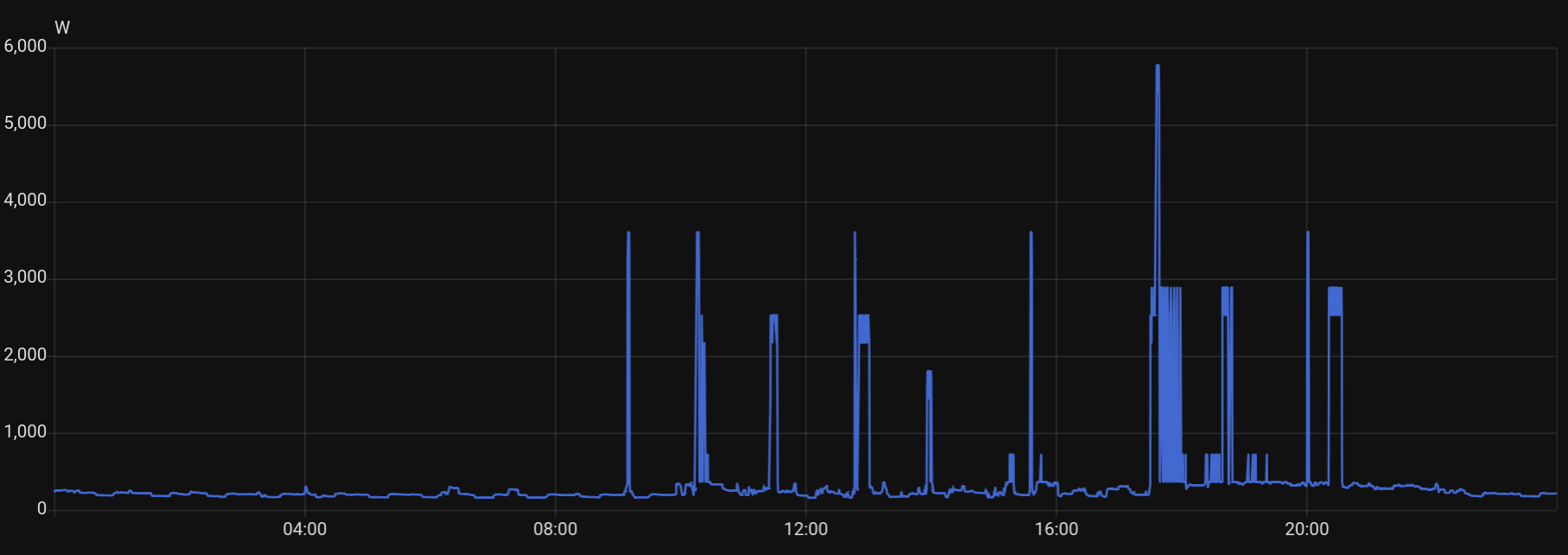
There’s one limit the widget makes plain. Each 10-second report can only count whole watt-hours, so it’s only good to the nearest 360 W. With the kettle on, the reports hop between 2.9 and 3.2 kW. Over a longer spell the averages come out right, and it’s still far more immediate than metermon’s 10 Wh lumps.
Where it stands
The code is on GitHub as zigbee-electricity-meter, with the circuit, the board definition, the build steps and the Zigbee2MQTT converter. It joins the network as a sleepy end device, reports energy and live power, and reports its battery once an hour.
It’s on the meter now, taking over metermon’s electricity job. Here’s a whole day of live power in Home Assistant, something metermon’s 10 Wh lumps could never have drawn:
Project assisted by Claude Code.